How to add funds to your account balance
Your account balance is money you keep with us. Top it up once, then pay for any order with one tap — no QR code at checkout, no waiting. Anything you don't spend stays yours: use it next time, or withdraw it back to your wallet.
Funds are added with USDC — a digital dollar, 1 USDC = $1 — sent over the Solana network. If you use Cash App, it's built in: you send dollars from your Cash balance and they arrive here as USDC, usually within seconds, with no fee.
Step 1 — Open Add funds
Go to Your account → Balance and tap Add funds (it's also in the menu under your name). The first screen, Add funds with Cash App, shows the three taps you'll make in Cash App. Tap Show my deposit address.
Step 2 — Your deposit address
You'll see your deposit address as a QR code, with the full address and a Copy address button. This address is unique to you and never changes — you can save it in Cash App as a contact and reuse it every time.
Keep this page open; it watches for your transfer.
Step 3 — Send from Cash App
In Cash App:
- Open Payments ($), enter any amount, and tap Pay.
- Paste your deposit address into To, or scan the QR code. Choose Solana when asked for the network.
- Check that it says USDC on Solana, then tap Send.
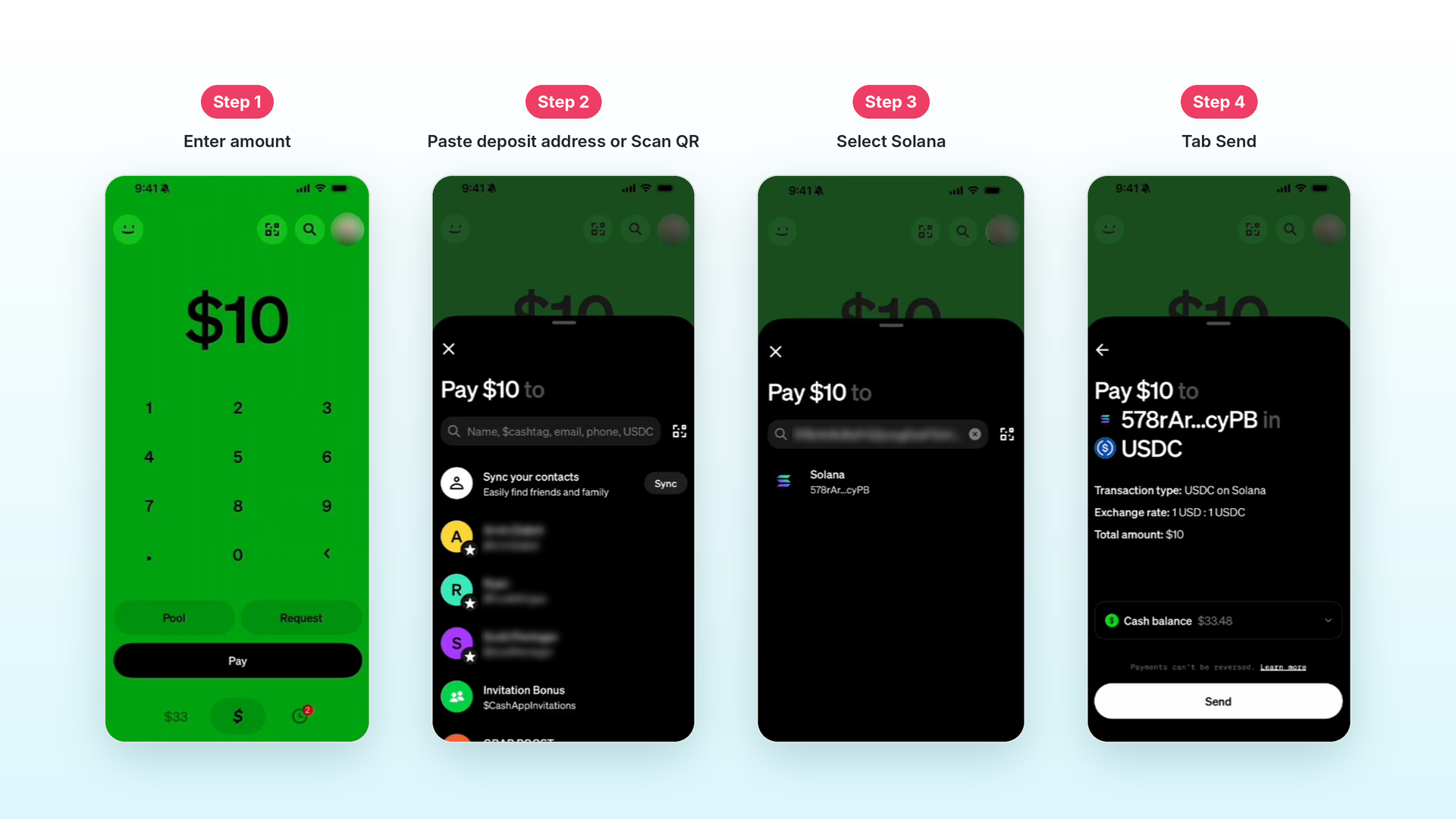
There's no minimum on our side; Cash App itself sends stablecoins from $1.
Step 4 — Funds added
A few seconds after you send, the page changes to Funds added, with the amount received and your new balance, and you'll get a receipt by email. Tap Done.
Closed the page too early? Nothing is lost — your transfer is credited to your balance within a minute or two, whether the page is open or not.
Paying with your balance
At checkout, when your balance covers the order, Account balance is already selected — just tap Pay from balance. If it covers only part, choose Cash App (USDC) and you'll be asked to send only the difference.
Not using Cash App?
Any app that sends USDC on the Solana network works the same way — scan the QR code or paste the address, pick Solana, send:
- Coinbase — buy USDC with a card or bank, send it to your deposit address. Available in most countries.
- Kraken — the same, popular outside the US.
- Phantom — a free wallet app, if you already hold USDC.
Exchanges take a small withdrawal fee out of what arrives, so send a little more than you need; the extra stays in your balance.
Good to know
- Only USDC on Solana is credited. SOL, other coins, or USDC on another network (Ethereum, Base…) won't count — check USDC on Solana before you send.
- Your deposit address is permanent. Money sent to it at any time, even without opening the page, lands in your balance.
- Cash App needs a verified account and applies its own daily and weekly limits to stablecoin sends. USDC isn't offered to Cash App users in New York.
- Every top-up appears in your account's payment history, and the balance can be withdrawn at any time — see how to withdraw.