How to withdraw your balance to Cash App (or any wallet)
 Money in your account balance — a refund, or extra you sent when adding funds — is yours to take out whenever you like. This page walks through it once; after the first time it's two taps.
We pay withdrawals in USDC
Withdrawals are sent as USDC, a digital dollar: 1 USDC is always $1. We send it on the Solana network, which is why it works so well for small amounts:
- Fast — it usually lands in minutes, any day, any hour.
- Cheap — one small fixed fee, shown before you confirm. No bank wires, no card fees.
- Simple — you don't have to understand crypto. Cash App takes USDC and turns it straight into dollars in your Cash balance.
Cash App supports USDC on Solana out of the box. If you already use Cash App, you have everything you need.
Step 1 — Get your USDC address from Cash App
This is a one-time setup. Your address is like an account number for receiving USDC.
- Open the Money Tab: Launch Cash App and tap the bank or balance icon in the bottom-left corner of the screen
- Scroll down to the bottom and tap Deposit stablecoins or Deposit USDC.
- Choose Solana as the network.
- Tap Copy on the address Cash App shows (it's a long string of letters and numbers).
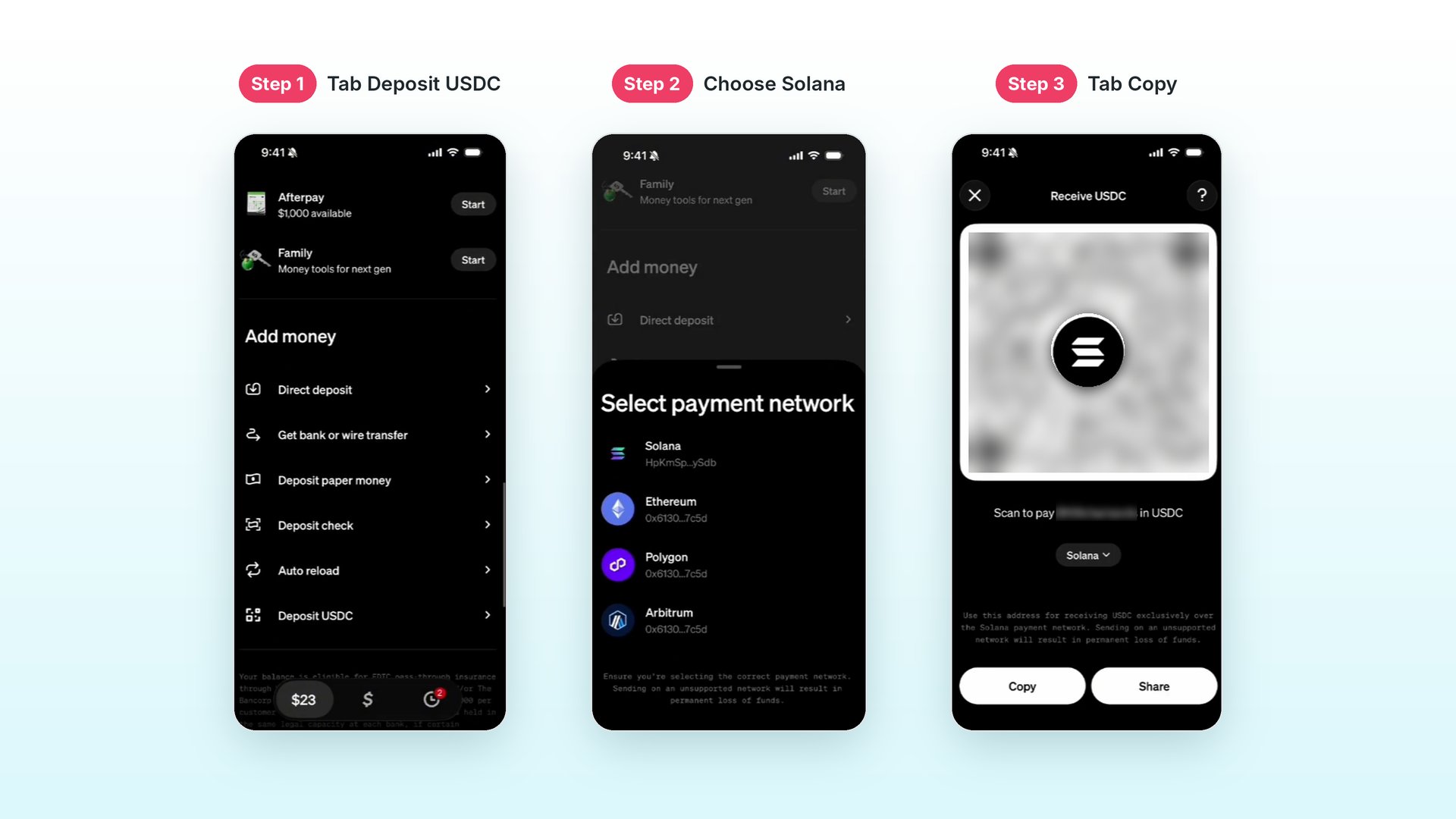 That's it — keep it on your clipboard for the next step.
Step 2 — Save the address in your account
- Open Your account → Settings → Withdrawals.
- Paste the address and tap Send code.
- We email you a 6-digit code. Enter it and tap Save address.
Why the code? It proves the address is really yours, so no one who got into your account could send your money somewhere else. The address stays saved for every withdrawal from now on. You can change it any time in Settings — each change needs a new code.
Not getting the email? Check your spam folder. If it still doesn't arrive, message support and we'll help.
Step 3 — Withdraw
- Open Your account → Balance and tap Withdraw.
- Enter the amount and tap Next.
- Check your USDC address — it's shown in full. If it's yours, tap Yes, continue.
- The confirm screen shows the amount, the fee and exactly how much USDC you'll receive. Tap Withdraw now.
Your withdrawal is now in the queue. Nothing more to do.
What happens next
- You usually get your money back in under a minute.
- If we're busy it can take up to 48 hours — you'll get an email the moment it's sent.
- In Cash App, the USDC arrives and is converted to dollars automatically in your Cash balance. Spend it, send it, or cash out as usual.
Please remember
- Solana network only. An address from another network (Ethereum, Base, Tron…) cannot receive the payment, and money sent there is gone for good.
- Check every character of the address before saving it. Once a withdrawal is sent, it cannot be reversed — not by us, not by anyone.
- The address must be your own wallet or exchange account.
Not using Cash App?
Any app that gives you a USDC address on Solana works the same way. A few good ones:
- Coinbase — the easiest way to turn USDC into dollars outside Cash App: receive USDC, sell it for USD in one tap, cash out to your bank. Available in most countries.
- Kraken — same idea, popular outside the US, low fees.
- Phantom — a free wallet app. No sign-up, no bank; your USDC stays as USDC until you send it to an exchange or spend it.
How to get a USDC address on Solana has the steps for all of them.